
Arrears Billing
Billing that keeps up with the job
Charge customers for the equipment they actually have on hire, with every quantity and price change itemised on a single invoice.
The problem
Fixed hire doesn’t fit every job
Regular install jobs charge a fixed price based on the initial hire period.
Fixed from day one
The price is set by the initial hire period, however the job changes.
Quantities change
Equipment is delivered at the start, then part of it is collected halfway through.
Paying for what’s gone
A fixed price can leave customers paying for equipment that is no longer on site.
The fix
Arrears Billing charges for what’s actually on site.
Overview
Charged for what’s in use
Billing that follows the equipment on site.
Unlike regular install jobs, Arrears Billing charges customers based on what they are using throughout the period. Everything is combined into a single invoice at the end of the hire period, with quantity and price changes itemised.
- Fair billing
- One invoice
- Automatic periods
Customers only pay for what they have on site.
How it’s charged
100m, then 50m. Billed exactly.
Charged for what’s on site, period by period.
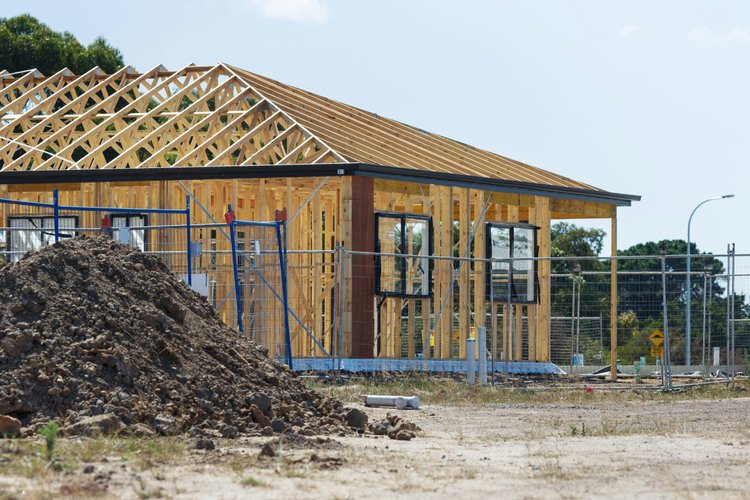
If a customer has 100m of fencing delivered at the start of the hire period and 50m is picked up halfway through, they are charged for 100m in the first half and 50m in the second.
- Charged for what’s on site
- Changes itemised on the invoice
- One invoice at period end
- Hire splits automatically at pickup
Pickup of 50m on the 15th
How it works
Set up once, bill every period
Four steps from configuration to a single, itemised invoice.
Step 1
Set up products and rates
Mark products as arrears compatible and create Install, Hire and Pickup rates.
Step 2
Create the arrears job
Switch the Job Type to Arrears, then add an Install with its equipment.
Step 3
Pick up as the site changes
Add a Pickup whenever stock is collected. The hire splits automatically.
Step 4
Invoice the period
One itemised invoice, and the next period is created straight away.
Set up · Rates
Flexible arrears rate tables
Choose how each period behaves.
Mark your products as arrears compatible, create a Hire task to work with them, and set your Install task defaults. The Hire rate table sets the period and the price. Flexible Arrears also supports multiple hireable products on one job.
- Flexible Arrears (recommended)
- Set periods in days or months
- EOM Limit locks periods to month end
- Per Day Rate keeps pricing consistent
Set up · Rate groups
Rates follow the customer
Assign the rates once and every arrears job uses them.
Rate tables
Install, Hire and Pickup
Install delivers equipment to site. Hire sets the period and the rate. Pickup removes equipment from site.
Rate group
Arrears Rate Group
Your rate tables, assigned to the hireable product. Start from the Standard Arrears Rates included with Hire It Out.
Customer
Customer Rates tab
Assign the arrears rate group on the customer’s Rates tab. Every arrears job for that customer uses it.
The job · Create
Create an arrears job
Switch the Job Type to Arrears and add an Install.
There is no hire duration on the Install itself. The period is controlled by the Hire rate, which is applied automatically once the install becomes active.
- Add an Install and its equipment
- Hire task is added automatically
- Rate and period come from the rate table
- Check the period with the Periods button
| Task | Mtrs | Rate | Start | Days |
|---|---|---|---|---|
| Install | 100 | $0.00 | 3 Oct | 0 |
| Hire | 100 | $2.00 | 3 Oct | 28 |
| Task | Mtrs | Start | End | Days |
|---|---|---|---|---|
| Install | 100 | 3 Oct | 3 Oct | 0 |
| Hire | 100 | 3 Oct | 15 Oct | 12 |
| Pickup | 50 | 15 Oct | 15 Oct | 0 |
| Hire | 50 | 15 Oct | 31 Oct | 16 |
The job · Pick up
Part pick-ups split the hire
Quantities and price adjust when stock is collected.
Add a Pickup whenever stock is collected during the period. Confirm the quantities and the hire is split in two.
- Choose Part Pick-up and set the quantity
- Confirm pickup quantities (pre-filled)
- The hire splits at the pickup date
- The second part is priced on what remains
The job · Invoice
One clear invoice per period
Every quantity and price change, itemised.
The invoice shows a detailed breakdown of the equipment on the job during the period, in a form that makes sense to your customers.
- Quantity and price changes itemised
- Combined into a single invoice
- Invoice straight from the job screen
- Next period created automatically
| Period | Mtrs | Days | Hire |
|---|---|---|---|
| 3-15 Oct | 100 | 12 | $2,400.00 |
| 15-31 Oct | 50 | 16 | $1,600.00 |
Benefits
Fair for customers. Simple for you.
Built for hire jobs where quantities change during the period.
Customers pay for what they use
Charged for what’s actually on hire throughout the period, not a fixed price.
Changes itemised
Quantity and price changes are itemised, so the invoice makes sense to customers.
One invoice per period
Everything is combined into a single invoice at the end of the hire period.
Periods roll on automatically
Once a period is invoiced, the next one is created straight away.






Billing that keeps up with the job
See an arrears job set up, picked up and invoiced in Hire It Out.
Book A Demo